Works with the Claude in Chrome extension
Turn any product page into a Meta ad. In one click.
Copilot reads the product, writes the ad, picks the audience and checks the math. Claude builds it in Ads Manager, paused, waiting for your OK.
Created paused. Nothing spends until you approve.
Detects products on
- Shopify
- WooCommerce
- Amazon
- eBay
- Any store with product data
Meta ads are easy to start and easy to lose money on.
Boosting a post takes a minute. Knowing whether it paid for itself, and what to change when it didn't, is where the money goes. Copilot handles those parts.
Without Copilot: Ads Manager is built for media buyers: dozens of settings and words like CPA, CBO and ROAS.
With Copilot: Copilot fills in the settings from your product page and explains everything in plain words.
Without Copilot: You spend for a week and still cannot tell if a single sale came from the ad.
With Copilot: Copilot works out the most each sale can cost from your price and margin, and warns you when a campaign goes over it.
Without Copilot: Meta's tips to raise the budget or widen the audience are based on Meta's averages, not your margin.
With Copilot: Every tip is judged against your own numbers before you press Apply.
Without Copilot: Fixing a weak campaign means an evening of clicking through menus.
With Copilot: Tick the problems and Claude does the clicking in your browser, leaving changes paused for your OK.
From product page to paused campaign in three steps.
- 01
Open a product page
A small bar appears: Product detected. Copilot reads the name, price, photos and description for you.
- 02
Approve the ad
AI writes three versions, picks business owners or shoppers as the audience, and tells you the most each sale can cost.
- 03
Claude builds it
Claude in Chrome clicks through Ads Manager in your browser and leaves the campaign paused for your OK.
What a campaign that pays looks like.
The math behind a campaign: what you spent, what it sold, and what you actually kept after your costs.
Sample store
Sponsored
80 km on one charge, and it plugs into any home outlet. Order online, delivery included.
Electric motorcycle
$1,849
Sample campaign · 14 days
Making money- Spent on ads
- $642.35
- Sales
- 5
- Sales value
- $9,245
- Sold per $1 of ads
- $14.39
Your limit is your margin per sale: the most a sale can cost before you lose money.
- Day 1: $41.20
- Day 2: $43.85
- Day 3: $44.10, 1 sold
- Day 4: $46.30
- Day 5: $45.75
- Day 6: $47.20, 1 sold
- Day 7: $46.90
- Day 8: $45.60
- Day 9: $48.15, 1 sold
- Day 10: $46.05
- Day 11: $44.80
- Day 12: $47.35, 1 sold
- Day 13: $47.95
- Day 14: $47.15, 1 sold
What you kept
$1,407.65
5 × $410 margin − $642.35 ads = $1,407.65
Meta Pixel5 purchases measured
Copilot reads the purchases your Meta Pixel reports in Ads Manager. If no purchases are being tracked, Copilot warns you to connect the pixel.
High price, few sales. At $128.47 per sale this campaign looks expensive, but it is well under your $410 limit, so Copilot tells you to keep it running.
Made-up numbers that show how Copilot does the math. They are not typical or promised results: many campaigns lose money, and yours depend on your product, price, margin and audience. Copilot shows you your own numbers so you can pause what does not pay.
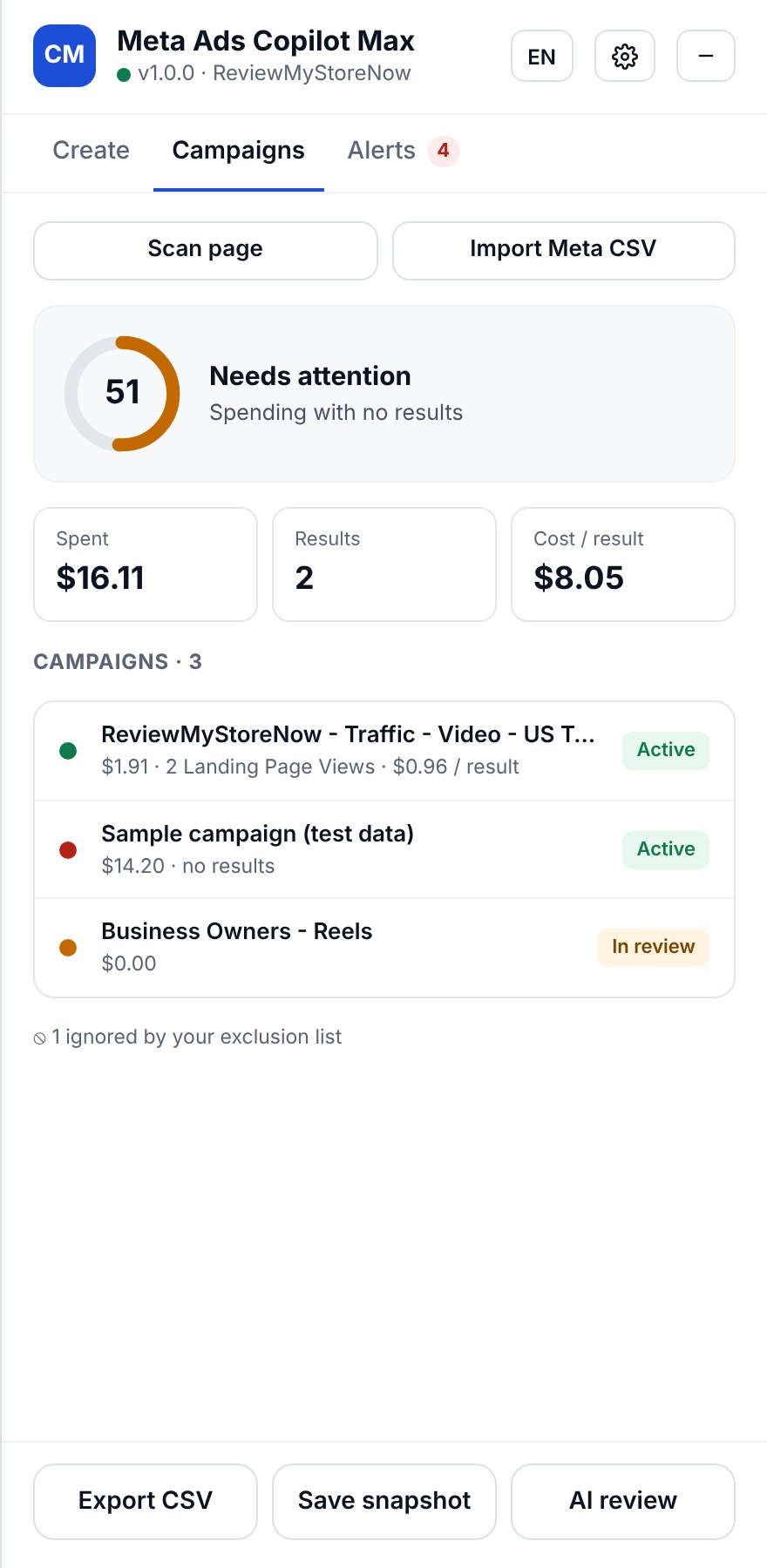
Campaigns tab
Know if your ads make money.
Open Ads Manager and Copilot reads every campaign, scores the account from 0 to 100 and tells you in plain words what to do next.
- Alerts for spending with no results and cost per sale above your margin
- Low click-through, high frequency, ads stuck in review or rejected
- Meta's tips judged against your numbers, not their averages
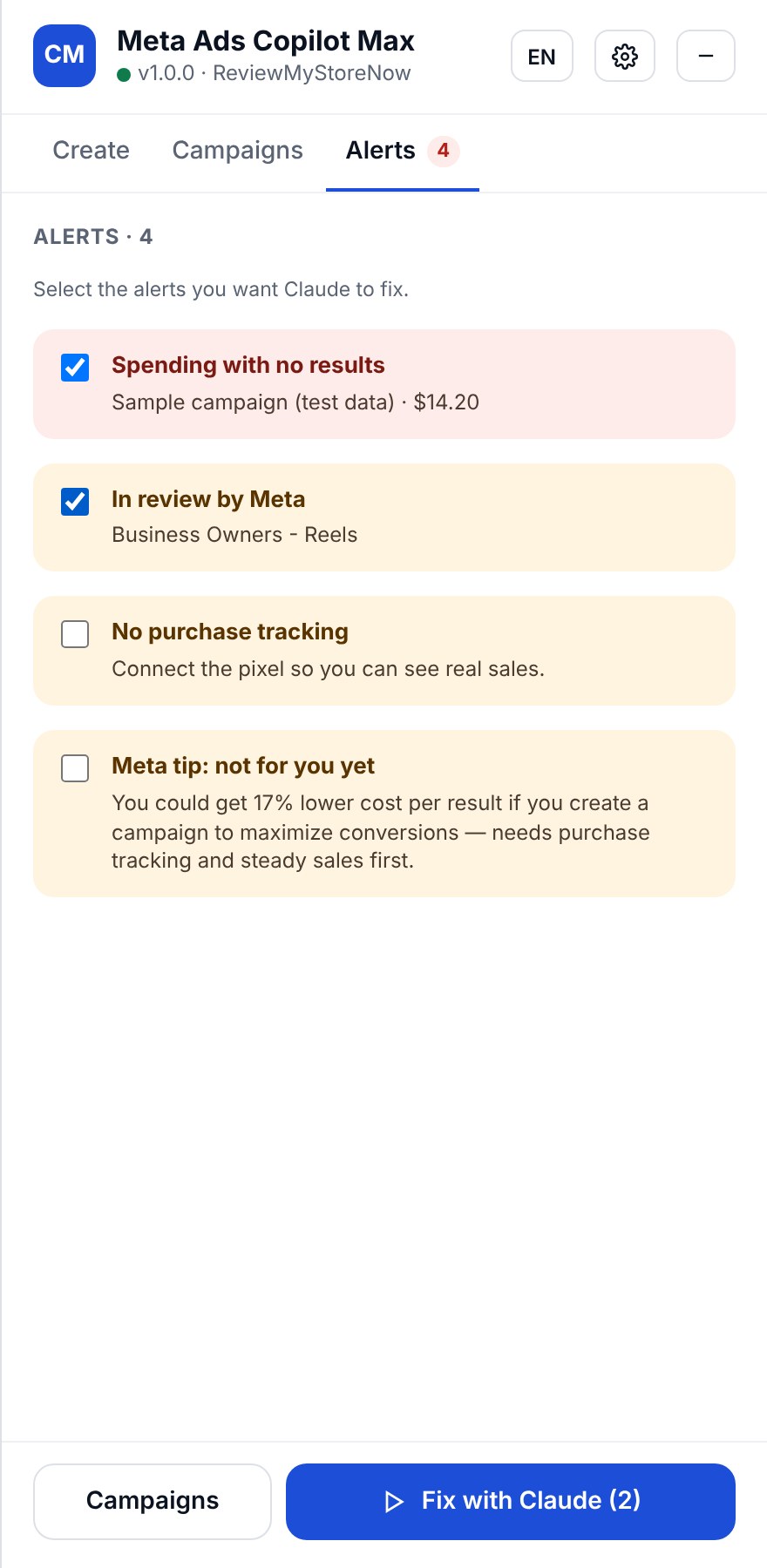
Alerts tab
Tick the problems. Claude fixes them.
Pick the alerts you care about and press Fix with Claude. Copilot writes the exact steps; Claude does the clicking in your own browser and reports back what changed.
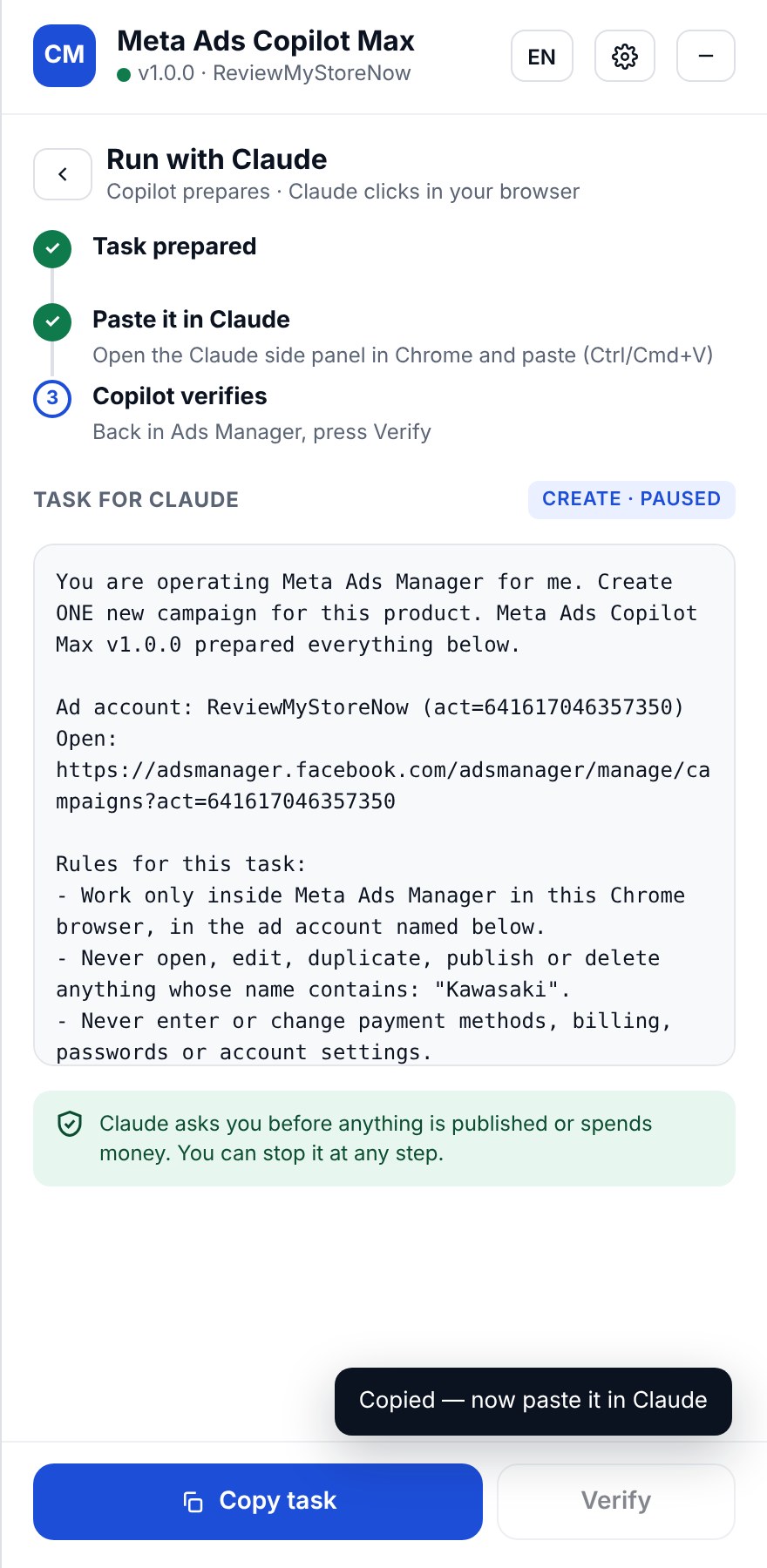
Run with Claude
Claude does the clicking. You keep the final say.
- Asks before anything is published or spends money
- Never touches billing, payment methods or passwords
- Skips every campaign on your exclusion list
- New campaigns are created paused; you turn them on
Everything else you need, nothing you don't.
Brand rules
List the words your ads must never use. Copilot removes them from every draft.
One workspace per ad account
Margins, budgets, rules and history kept apart for every client you manage.
Your own AI key
Connect your OpenRouter account and choose the model. No AI key? Templates still work.
Runs on your computer
A small local server keeps your data and starts on its own on Windows, macOS and Linux.
English and Spanish
Switch the panel language in one click, and write ads in either language.
CSV in, CSV out
Import Meta's exports when Ads Manager isn't open, and export reports for your clients.
One plan. Every feature.
Copilot license
Founding offer$49/ month
Billed yearly, $588 per year
- Product to ad, with AI or templates
- Campaign score, alerts and AI review
- Create and Fix with Claude
- Unlimited ad accounts and clients
- Setup help and updates included
You need Tampermonkey and, for automation, Claude in Chrome.
Questions
Does it publish ads without me?
No. New campaigns are created paused, and Claude asks you before anything is published or spends money.
Does it need my Meta password?
No. It works in the browser where you are already signed in to Ads Manager. It never asks for passwords or payment details.
What do I need to install?
Tampermonkey in Chrome, the Copilot script, and Node.js for the small local server. Claude in Chrome is needed for the Create and Fix buttons.
Which AI writes the ads?
The model you choose through your own OpenRouter account. Without a key, Copilot uses built-in templates.
Stop paying for clicks that don't buy.
Your next ad is one product page away.